Agents
An agent is the runtime that executes your flows. It runs inside your own environment (your cloud VPC, on-premises, or similar) and does all the data processing locally, so the data being validated never leaves your network.
The Vaurd platform is where you design things. The agent is where they actually run.
You build events, sources and flows in the web application. The platform then pushes those definitions down to your agent. When one of your systems emits an event, the agent receives it, runs every flow attached to that event, connects to your source systems to fetch the data those flows need, evaluates the rules, and triggers the actions. Only execution results and health information travel back to Vaurd.
Because the agent runs in your environment, the data being validated never crosses your network boundary.
Where to find your agents
In the web application, open Configure → Agents. The list shows every agent in your organization with its name, endpoint and current status. Select an agent to open its details, where you can see the sources it is connected to, the plugins it has installed, and its registration history.
Placeholder: the Configure → Agents list, showing agents with their endpoint and status columns.
Agent components
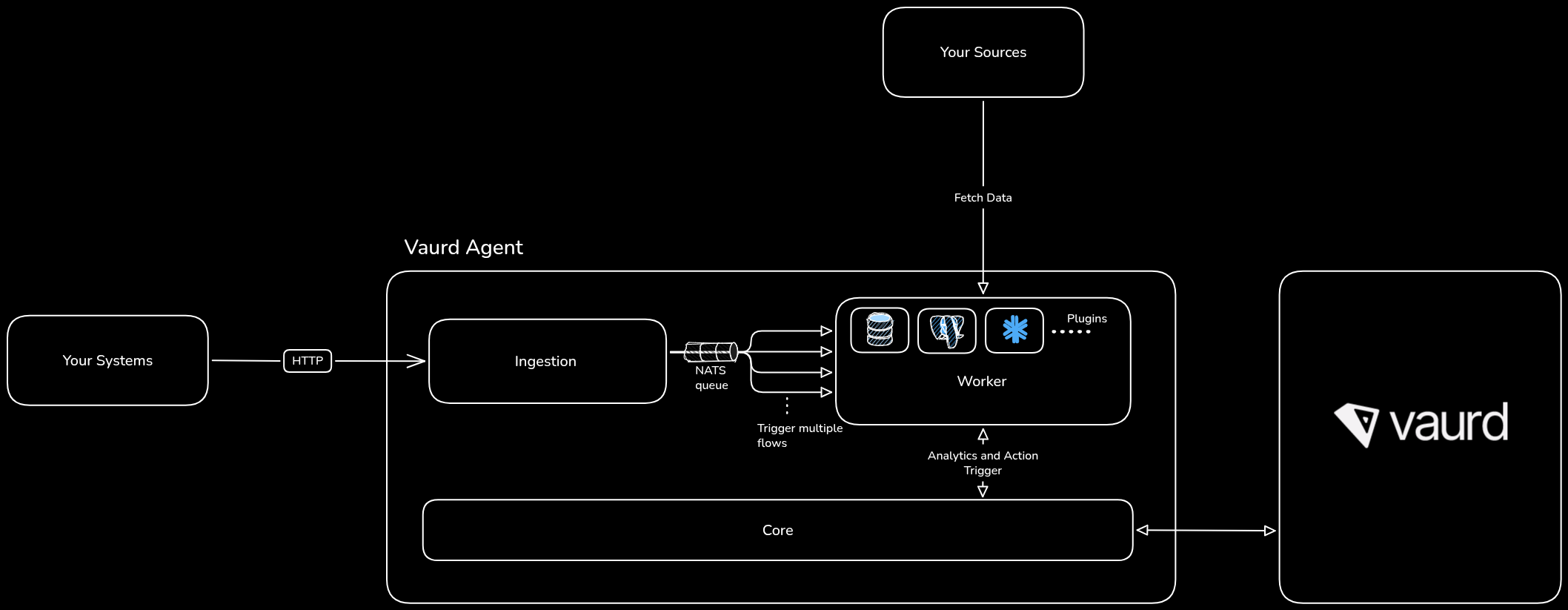
An agent is not a single process. It is three components that run alongside each other, plus a NATS message bus that connects them.
- Core is the agent's control plane. It registers the agent with Vaurd, downloads the plugins the agent needs, receives your published flow versions and event definitions, sends a regular heartbeat, and ships execution results back to the platform. It also holds the key to the agent's local database and hands it to the other components at start-up, so core has to be running before anything else works.
- Ingestion is the front door for your systems. It exposes an HTTP API that you post events to. When an event arrives it is validated, recorded, and put on the queue. Ingestion also works out which flows a given event should trigger.
- Worker is where flows actually execute. It takes scheduled flows off the queue, walks each node in turn, and connects out to your source systems to fetch the data a flow asks for.
NATS carries the messages between them. Ingestion publishes an event and matches it to flows, and workers pick those flows up and run them. Because each message is delivered to exactly one consumer, you can run more ingestion and worker instances to handle more load.
How a flow runs
Publishing a flow does not run it. It sends that version of the flow down to the agent, where it sits waiting for its event. The same is true of events and sources: the platform syncs their definitions to the agent so the agent can recognise and use them.
A single run looks like this:
- Your system posts an event to the agent's ingestion API, naming the event type and including its data.
- Ingestion validates and queues it. The event type must be one you created in the platform and synced to this agent, and the data must match the parameters that event declares.
- Ingestion matches the event to flows. Every published flow version whose event node points at that event is scheduled. If a flow has a delay configured, it is held for that long first.
- A worker executes each flow. It evaluates the nodes in order: fetching from your sources, evaluating rules, and triggering actions on the branches those rules select.
- Results are reported back. The agent records what happened locally and ships a summary to the platform, where it appears in the agent's analytics.
Several flows can be attached to the same event. They are scheduled independently and run in parallel, so one slow flow does not hold up the others.
What leaves your network
This is the part that matters most for review, so it is worth being precise.
The agent connects to your source systems and pulls real rows out of them. Those rows are held in the agent's local database, which is encrypted on disk, and are used to evaluate your rules. That database lives on a volume you provide, inside your environment.
What the agent sends back to Vaurd is telemetry only: which flow ran, which version, when it started, how long it took, whether each node succeeded or failed, and log lines from the run.
Fetch nodes are treated specially. A fetch node's real output is the rows it read from your database, so before any telemetry is emitted the agent replaces those rows with a description of their shape: the column names, the column types, and how many rows came back. The values themselves are never put on the telemetry stream at all, so they cannot be shipped even accidentally. This is a fixed guarantee, not a setting you can turn off.
What the agent needs to reach
Three connections matter when you plan where to run the agent:
- Vaurd must be able to reach the agent's core. The platform calls the agent to register it, publish flows and sync events, so core's gRPC port has to be reachable from Vaurd at a public endpoint. That endpoint is what you enter when you register the agent.
- Your systems must be able to reach ingestion. This is the HTTP API you post events to. If everything that emits events runs inside the same network, ingestion never needs to be public.
- Workers must be able to reach your sources. Fetch nodes connect directly to your databases from inside the worker, so run the agent somewhere with network access to them.
The agent also needs outbound access to Vaurd for its heartbeat, plugin downloads and telemetry.
Registration
An agent cannot do anything until it has been registered. Registration is the handshake that turns a running set of containers into a known agent in your organization.
Conceptually it does three things. It proves the agent is yours, using a license key issued by the platform that the agent presents when it connects. It gives the agent its identity, so the platform knows which agent is reporting and which flows belong to it. And it provisions the agent, downloading the plugins it needs for the source types you have configured and preparing its local database.
Registration is driven from the web application, but it only succeeds once the agent is actually deployed and reachable, because the platform has to call it. The full walkthrough is in Registering an agent.
Agent status
Every agent has a status, shown in the web application and updated from the agent's own heartbeat. You cannot set it by hand.
While an agent is anything other than connected, its workers stop taking flows off the queue. Events you post in the meantime are still accepted and recorded, and the ingestion API tells you they will not be processed yet, so nothing is silently lost.